
Creating a mailbox
Email on your own domain comes with every plan: 1 mailbox on Starter, unlimited mailboxes on Unlimited and Enterprise VPS. Mailboxes are created in the control panel, one per address, each with its own password.
Before you start
Mail for a domain is delivered to us only when the domain's DNS says so. If the domain uses our nameservers, the mail records are created for you when you add the site. If you manage DNS elsewhere, you will need to add the MX and related records yourself after creating the mailbox; the control panel shows the exact values. See Managing DNS records.
Create the mailbox
- In your account area, open the site for the domain and press Open control panel.
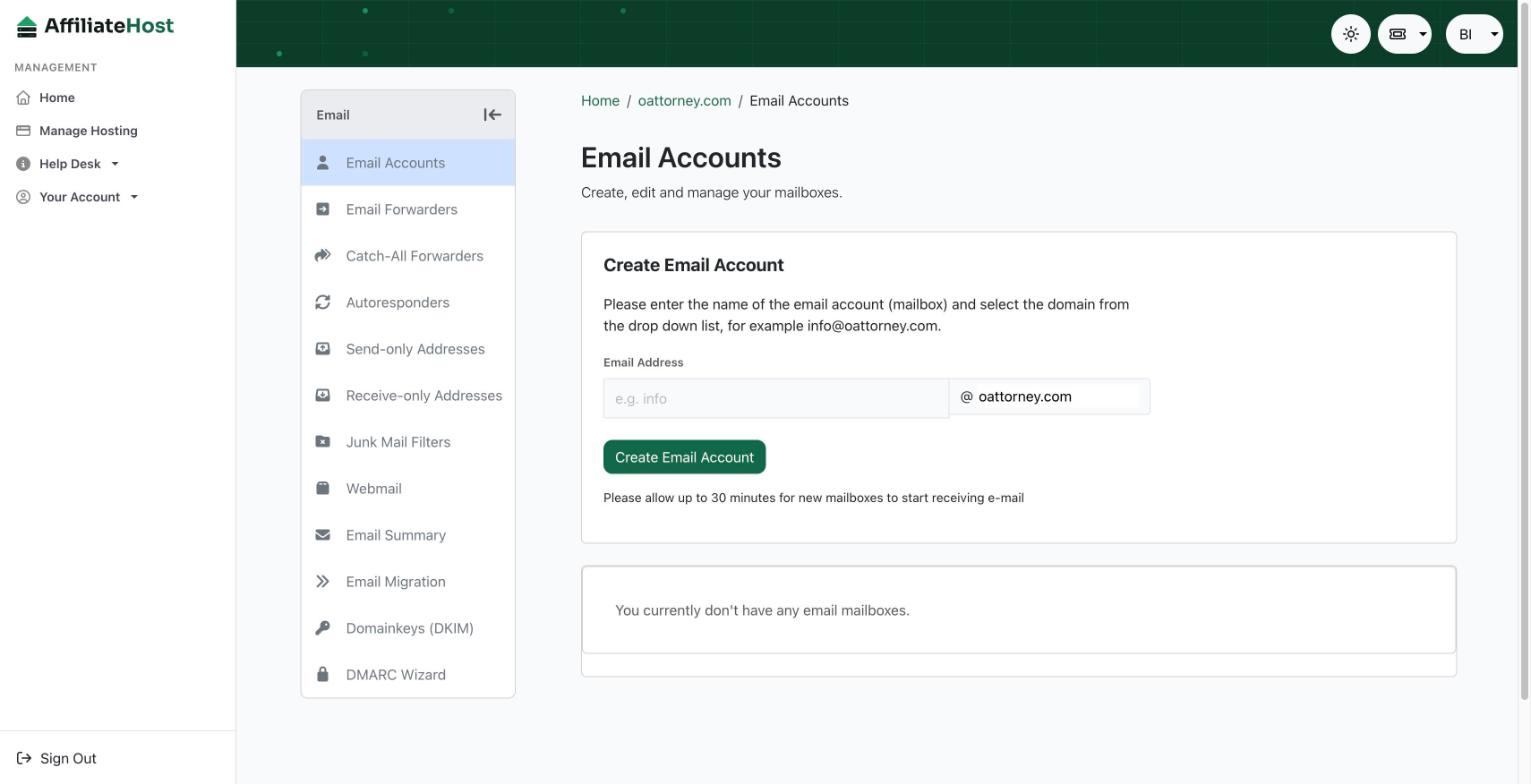
- Open the Email section and choose to add a mailbox.
- Type the part before the @ (for example
hello) and set a strong password. Save it in a password manager; you will need it for webmail and mail apps. - Save. The mailbox is ready immediately.
Reading your mail
Open webmail.affiliatehost.com and log in with the full address and the mailbox password, or set up your phone or computer: see Setting up email on your phone or computer.
Forwarders
A forwarder sends mail for an address on to somewhere else, with or without keeping a copy. Two common uses on affiliate sites:
contact@forwarding to the inbox you actually read, so you never miss a merchant or a reader.- A catch-all that forwards anything sent to your domain that does not match a mailbox. Handy for sign-ups with unique addresses; noisy if the domain gets spam.
Create forwarders in the same Email section. A forwarder does not need a mailbox or a password.
Autoresponders
An autoresponder replies automatically to every incoming message, for holidays or for "thanks, we reply within two business days". Set a start and end date so you do not forget to turn it off.
Sending from WordPress
WordPress sends mail for password resets and contact forms. For reliable delivery, point WordPress at a real mailbox on your domain with an SMTP plugin, using the hostnames in Setting up email on your phone or computer, rather than relying on the server's default mail function.
Limits and good manners
Mailboxes are for the normal email of a website and its owner. Bulk newsletters and marketing blasts should go through a dedicated newsletter service; sending them from a mailbox will trip sending limits and can hurt the reputation of your domain. Storage per mailbox is generous for a business inbox; if one fills up, archive old mail from your mail app.
Was this helpful? If something here is unclear or out of date, tell us and we will fix it.
Related articles
Detailed control panel how-tos live in the Help Desk inside your control panel. Open it from your account area.